
AI for operations teams that keeps every AI tool on the same page.
Every team picked its own AI tool. Connect your email, Slack, Drive and CRM to AgentOS once, and ChatGPT, Claude and the rest work from the same company context. Anything that goes out waits for a person to approve it.
The morning brief, before the first coffee. Overnight, 27 updates land across Slack, Gmail, Calendar and Drive. Otto, the AgentOS chief of staff, reads all of them and sends the three that change today's plan, each with where it came from. Example with demo data.
Read what happens in the video
It's 5:45 a.m. on a Monday, day 112 of a building project called Riverside Clinic. Updates pile up on the site lead's phone: an email about the door hardware spec, a delayed pump truck in Slack, a schedule question from the owner's rep, new photos in the daily reports folder, a meeting moved in Calendar. By the end there are 27. Otto reads all 27 and sends one morning brief to Dana with three things that matter today: the concrete pour moved to 10:00 because the pump truck is delayed (from Slack), the inspector is on site at 1:00 for level 2 framing (from Calendar), and the architect answered RFI 42 with the hardware spec approved (from Gmail). Every tool. One brief. Before the first coffee.
Nobody planned your AI setup. It just happened.
Every team picked its own tool
Sales lives in ChatGPT, marketing likes Claude, engineering has Cursor, and finance is trying Copilot. Each one knows a different slice of the company, so the same question gets three different answers.
Nobody owns it, so ops gets asked
When something goes wrong, the questions land with operations: what are we paying for, what can it see, and who checked the output before it went out.
The workarounds are already there
When the approved tool doesn't know the company, people paste files into whatever is open. In Pax8's October 2026 survey of 1,150 businesses with 5 to 499 employees, 35% of those using AI had found tools, workflows or agents running without approval in the last six months.
How AgentOS works for operations Connect once, keep your tools, approve what goes out.
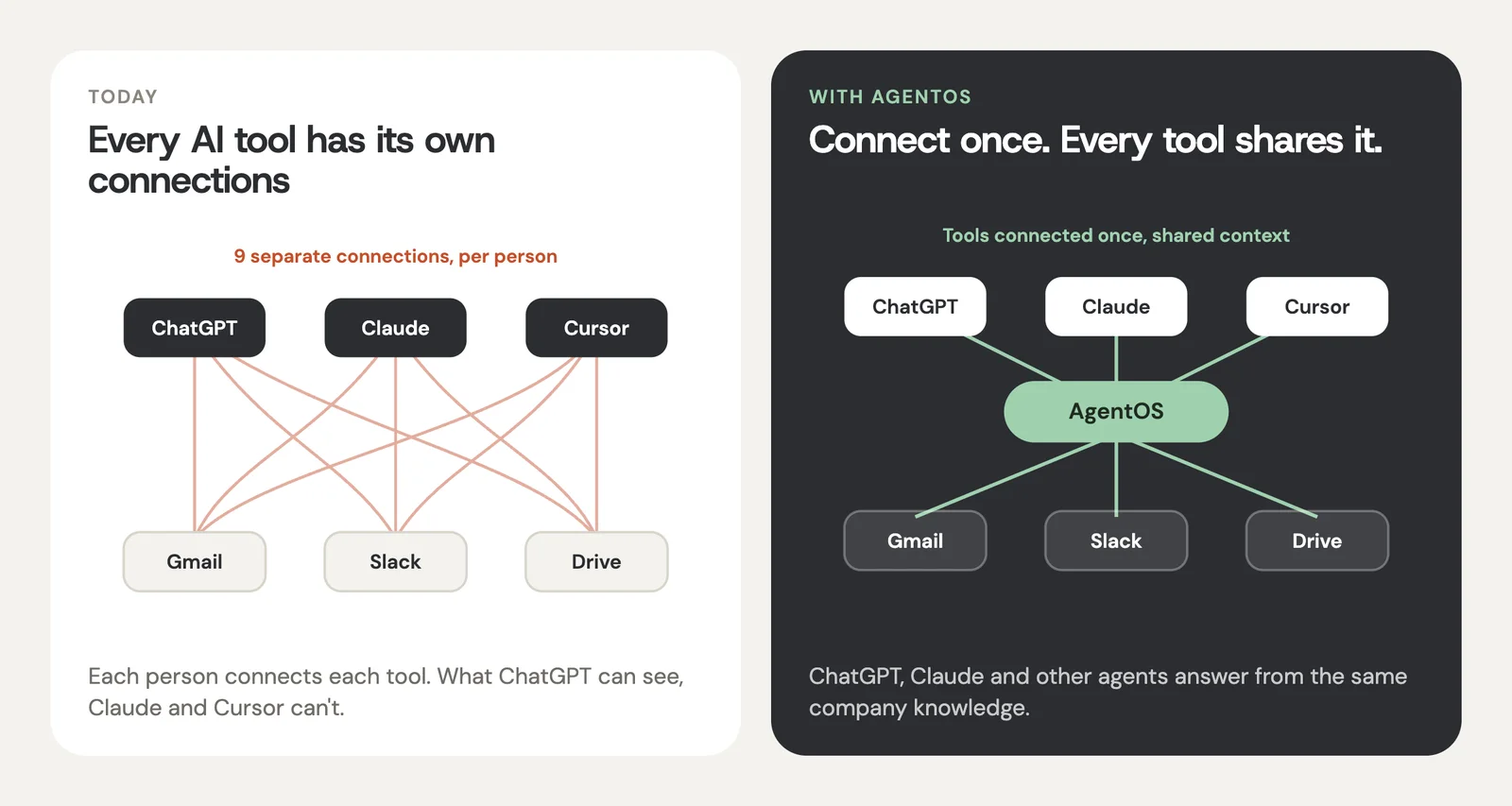
Connect the company once
Gmail, Slack, Google Drive, your calendar and your CRM. AgentOS keeps what the company knows organized and current, instead of each person wiring up their own AI.
Keep the tools teams already like
ChatGPT, Claude, Cursor and your own bots all work from the same company context. No migration, no ban, and the same answer whichever tool someone opens.
Decide what needs a sign-off
You choose what each AI tool can see and change. Emails to vendors and customers wait for a person to approve them before anything sends.
Workflows operations teams run in AgentOS Start with one you already do every week.
The weekly ops update
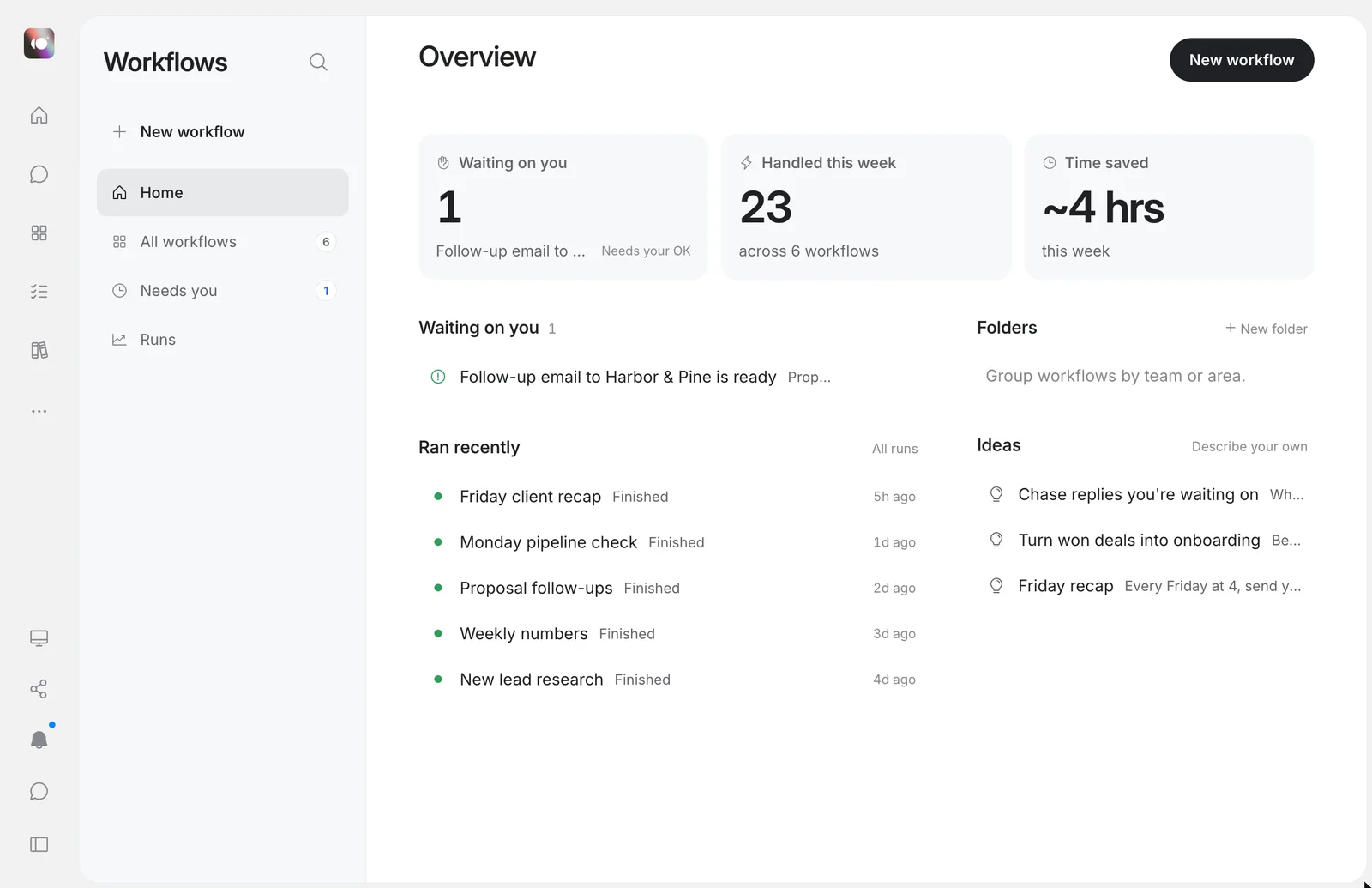
A draft of the week built from Slack channels, email threads, the pipeline and the calendar. You edit it, then it goes to leadership.
Vendor and customer follow-ups
Finds threads that went quiet, drafts the nudge with the terms from the contract in Drive, and waits for your OK before it sends.
"How do we do this here?"
Questions like "how do we issue a refund?" get answered from your own docs, with the source shown. The answer is the same in ChatGPT or in Claude.
Handoffs that don't lose the thread
When an account moves from sales to onboarding, or someone goes on leave, the handoff note is built from the real history, not from memory.
✓ Open questions from the last call
✓ Who to ask about what
An AI rollout plan that fits on one page.
Week 1: pick one workflow
Choose something the team already does every week, like the Monday update or vendor follow-ups. Connect only the two or three tools it needs.
Week 2: set the rules
Decide what each AI tool can see and what needs a human sign-off. A simple rule to start: anything that leaves the company gets approved.
Week 3 on: add the next one
Once the first workflow runs every week, add the next. Teams keep using the AI tools they like, now with the same context behind them.
Company data stays under your control
AgentOS uses OpenAI's and Anthropic's business APIs, which don't use your data to train their models.
Each workspace is isolated. Members of one workspace can never see another's content.
You decide what each AI tool can see and change, tool by tool.
Connection tokens are encrypted at rest, and disconnecting a tool deletes its stored credentials.
Details in our privacy policy.
Questions operations leads ask
What is the best AI for operations teams?
There isn't one tool that does everything, and most teams already use several: ChatGPT in sales, Claude in marketing, a notetaker on calls, maybe Copilot in finance. For an operations lead the bigger win is making those tools share the same company context. AgentOS connects your email, Slack, files and CRM once, so every AI tool your team picked answers from the same facts.
Do we have to make everyone switch to one AI tool?
No. AgentOS works with the AI tools your teams already like. ChatGPT, Claude, Cursor and your own bots connect to AgentOS and work from the same company knowledge, so nobody has to switch and nothing has to be banned.
How do we roll out AI to a team of 50 without losing control?
Start with one workflow people already do every week, like the Monday ops update or vendor follow-ups. Connect the two or three tools that workflow needs, decide what each AI tool can see, and require approval for anything that goes outside the company. Add the next workflow once the first one runs every week.
Will anything go out without someone checking it?
Not unless you set it up that way. Important actions, like sending an email to a vendor or a customer, wait for a person on your team to approve them.
Will our company data be used to train AI models?
AgentOS sends content to AI model providers such as OpenAI and Anthropic only to produce the work you ask for, and it uses their business APIs, which don't use your data to train their models. Each workspace is isolated, and you decide what each tool can see.
What does AgentOS connect to?
The tools operations teams use every day, including Gmail, Google Calendar, Google Drive, Slack, Notion, GitHub and CRMs. You choose what to connect, and you can disconnect anything at any time, which also deletes its stored credentials.
Where is our data stored, and for how long?
AgentOS runs on Fly.io for hosting, Supabase for the database and Cloudflare for file storage. Your workspace content is kept for as long as your workspace exists, and you can ask us to export or delete it at any time.
How much does it cost?
There's a free plan, so you can connect a few tools and run one real workflow first. See the pricing page for paid plans.
Want the background first? Read how ChatGPT connectors work, what a context lake is, or add up what your team pays for AI.
Give every AI tool your company uses the same context.
Connect two or three tools your team uses every day, then run your Monday update in AgentOS. Free to start.
Start for free ↗