ChatGPT connectors, explained: what they connect to and where they stop
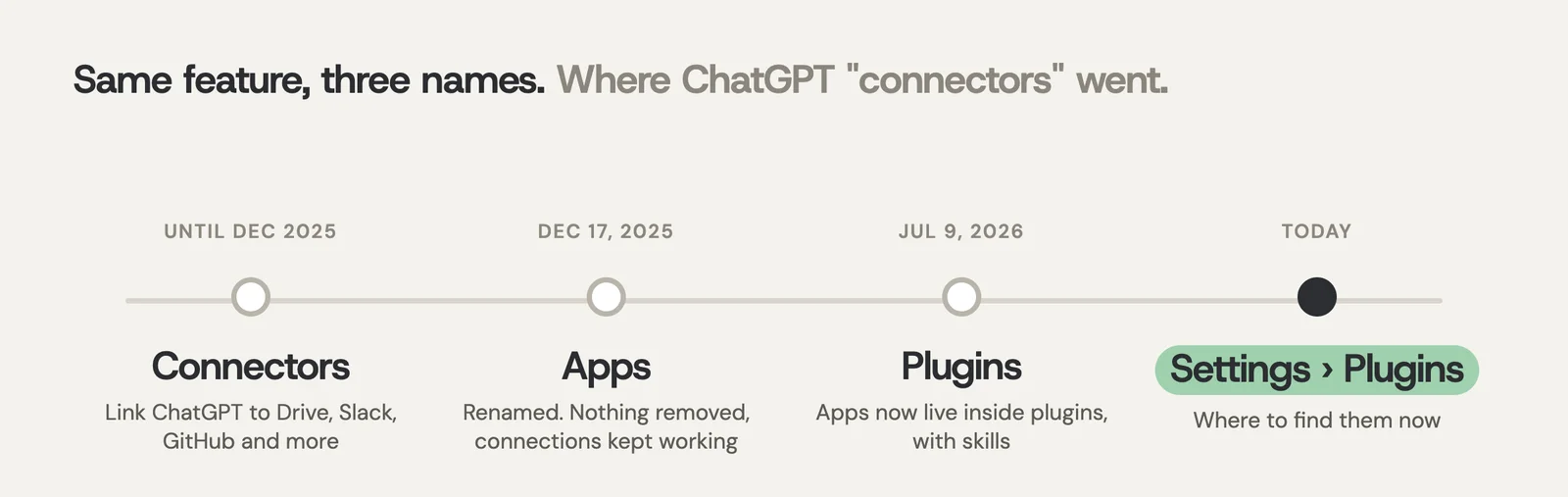
ChatGPT connectors let ChatGPT search and act on your other tools, like Google Drive, Slack, Gmail, SharePoint, Outlook, GitHub and Notion. OpenAI renamed connectors to apps in December 2025, and in July 2026 apps moved inside plugins, so today you find them under Settings, then Plugins. Each person connects their own accounts, ChatGPT only sees what that account can already see, and Business workspaces can add a Company Knowledge plugin for organization-wide answers. What connectors don't do is share that context with the rest of your AI tools. Claude and Copilot each need their own connections.
ChatGPT connectors at a glance
| What to know | |
|---|---|
| What they're called now | Apps, packaged inside plugins. "Connectors" was the name until December 17, 2025 |
| Where to find them | Settings, then Plugins. You can also @mention an app in a chat or pick it from the + menu |
| Popular apps | Google Drive, SharePoint, Microsoft Teams, Outlook email and calendar, Slack, GitHub, GitLab, Box, Notion, Gmail |
| What they can do | Search and summarize, act as sources in deep research, take supported actions, and start tasks when something new arrives |
| Who can use them | Depends on the app, your plan, region, workspace and role. On Business, many apps are on by default |
| Organization-wide answers | The Company Knowledge plugin, on Business, Enterprise and Edu only |
| Your own systems | Custom apps built on MCP (Model Context Protocol), which a workspace admin can make available |
| Permissions | ChatGPT only sees what your connected account can see. You choose when it asks before reading or acting |
| Training on your data | Not by default on Business, Enterprise and Edu. On Free, Plus, Go and Pro it depends on your "Improve the model" setting |
| What they don't do | Share what ChatGPT can see with Claude, Copilot or your other AI tools |
Taken from OpenAI's help center and release notes, checked October 15, 2026. OpenAI renames and rearranges these features often, so the menu names may have moved again by the time you read this.
What are ChatGPT connectors?
A connector is a link between ChatGPT and another service you use. Once you connect, say, Google Drive, you can ask ChatGPT to find your project brief and summarize the next steps, and it will search your Drive instead of asking you to paste the file in.
The name has changed twice, which is why so many people search for it. OpenAI renamed connectors to apps on December 17, 2025, and said nothing was removed. Then on July 9, 2026, it replaced the App Directory with a Plugin Directory. A plugin can bundle one or more apps with skills (reusable instructions) for a specific job. Your existing connections kept working through both changes.
So if you're looking for "connectors" in ChatGPT today, look for Plugins.
Want ChatGPT, Claude and Copilot to know the same things about your company? AgentOS connects your tools once and every AI tool your team uses works from the same company context. Free to start, no sales call.
Try AgentOS freeWhich apps can ChatGPT connect to?
OpenAI keeps setup guides for Google Drive, SharePoint, Microsoft Teams, Outlook email and calendar, Slack, GitHub, GitLab, Box and Notion, and Gmail, Google Calendar and Google Contacts are supported too. The Plugin Directory lists many more, from both OpenAI and other companies, and some carry an "OpenAI Verified" badge.
What you see depends on your plan, your region, your workspace and your role. Some apps may not be available in the EEA, the UK or Switzerland, and some plugins only work in the desktop app.
How do you connect an app in ChatGPT?
- Open Settings, then Plugins, and pick the app or the plugin that includes it.
- Select Install plugin if you see it. That may start the connection.
- Select Connect and sign in to the account that already has access to the files or messages you want.
- Review the permissions the app asks for and approve them.
- In a chat, type @ and the app's name, or choose it from the + menu, then ask for what you need.
On a ChatGPT Business workspace, many apps are switched on by default. If you see "Disabled by admin", your workspace owner has to turn the app on in the Admin console. Some apps, like an admin-managed Google Drive, don't need you to sign in at all.
What can you actually do with them?
- Search and summarize. Find a document, pull the key points from a long thread, check what was agreed in an email.
- Research. Use connected apps as sources in deep research, alongside the web.
- Take actions. Some apps can create or update things, such as adding a reminder in Slack. ChatGPT asks first unless you've told it not to.
- React to new events. Eligible users can set up a task that runs when a new Gmail message or Slack message arrives, or when a GitHub pull request changes.
Some apps can also sync, which means an admin sets them up to index content ahead of time so answers come back faster. A personal connection reads live instead.
What is Company Knowledge?
Company Knowledge is a plugin on ChatGPT Business, Enterprise and Edu that answers questions about your organization using every source you have connected, such as "summarize this account's latest feedback and risks." It respects the permissions in each source, so a person only gets answers from what they could already open themselves. You call it with @Company Knowledge.
It's the closest ChatGPT gets to a shared company brain. It still runs on each person's own connections, and it only lives inside ChatGPT.
Can you build a custom ChatGPT connector?
Yes. ChatGPT supports custom apps built on MCP, the Model Context Protocol, an open standard for connecting AI tools to data. In a workspace, an admin builds or approves the custom app and makes it available to the team. This is how companies plug in an internal database or a tool that isn't in the directory.
MCP matters beyond ChatGPT, too. Claude, Cursor and Microsoft Copilot all support it, so a system that speaks MCP can serve more than one AI tool.
Are ChatGPT connectors safe to use with client data?
Connecting is usually safer than the alternative, which is people copying client files and emails into a chat. With an app, ChatGPT can only see what the connected account can already see, and you decide when it has to ask before reading something or taking an action. Workspace admins can switch apps off, and on Enterprise they can block people from connecting work accounts to personal ChatGPT.
On training: OpenAI says it doesn't use information from connectors to train its models by default on Business, Enterprise and Edu. On Free, Plus, Go and Pro, it may, if the "Improve the model for everyone" setting is on. If you use a personal plan for work, check that setting.
Two things worth knowing. Data you share with a third-party app is handled under that app's own terms. And if Memory is on, ChatGPT may remember things it read through an app, unless the source blocks it.
What ChatGPT connectors don't solve
Connectors make ChatGPT better at your work. They don't do anything for the other AI tools your team uses.
Plenty of teams use more than one. Someone writes in ChatGPT, a developer lives in Claude or Cursor, and the company pays for Microsoft Copilot. Each has its own connector system: Claude connects over MCP, and Copilot has synced and federated connectors that run through Microsoft 365. Each person connects their own accounts, in each tool, one at a time. What one tool can see, the others can't.
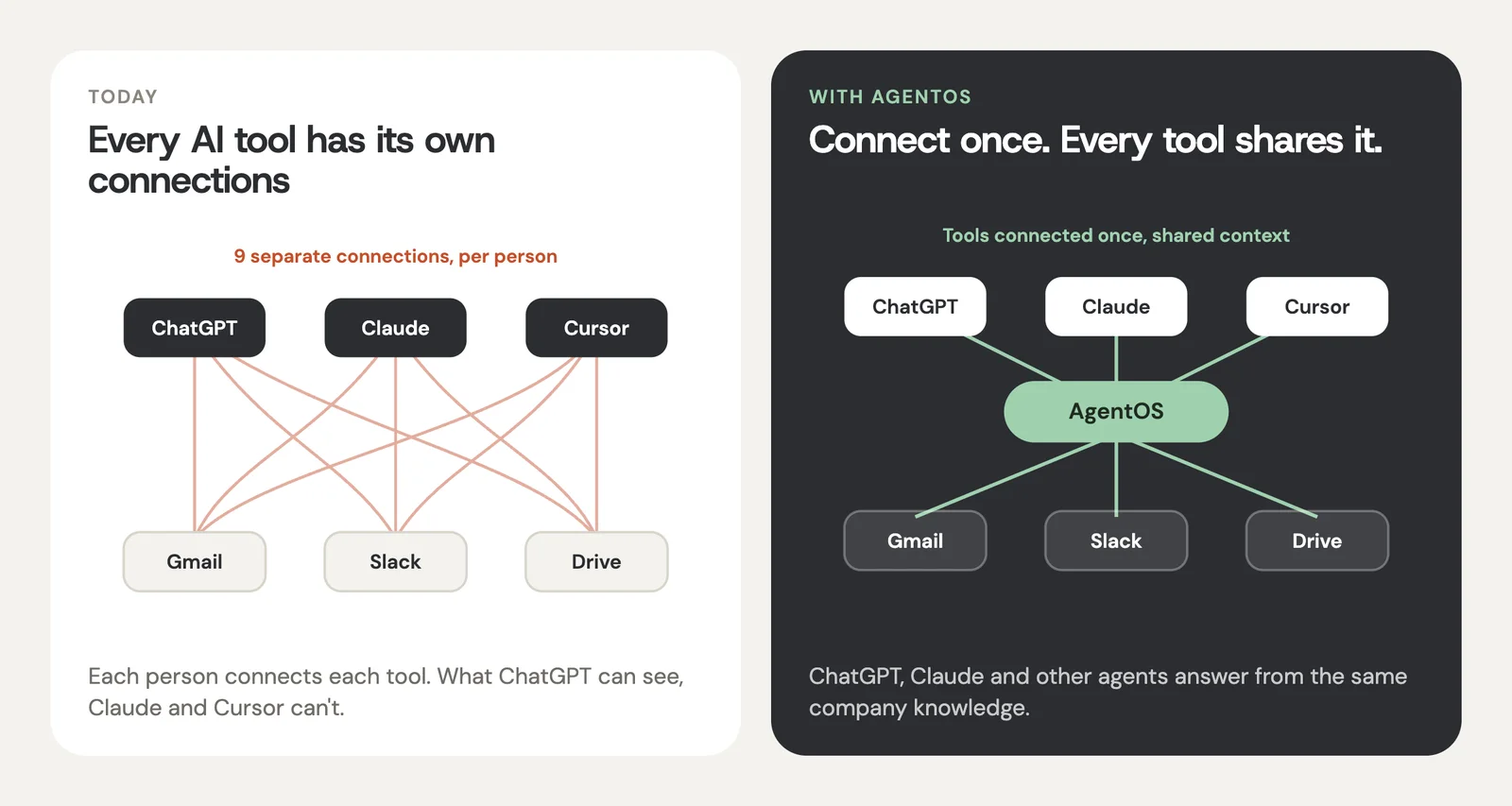
The result is the same question getting three different answers depending on who asked and where. People fill the gaps the old way, by pasting background in again.
Stop pasting. Connect instead. Connect Gmail, Slack, Drive and your CRM to AgentOS once. Then ChatGPT, Claude, Cursor and your own agents answer from the same company knowledge, and anything that goes out waits for a person to approve it.
Start for free Book a 20-minute walkthroughHow AgentOS fits with ChatGPT connectors
AgentOS doesn't replace ChatGPT or its connectors. It sits underneath the tools you already use. You connect your email, chat, files, calendar and CRM to AgentOS once, and it keeps one shared picture of the business. ChatGPT, Claude, Cursor and your own agents connect to it over MCP and answer from the same company knowledge.
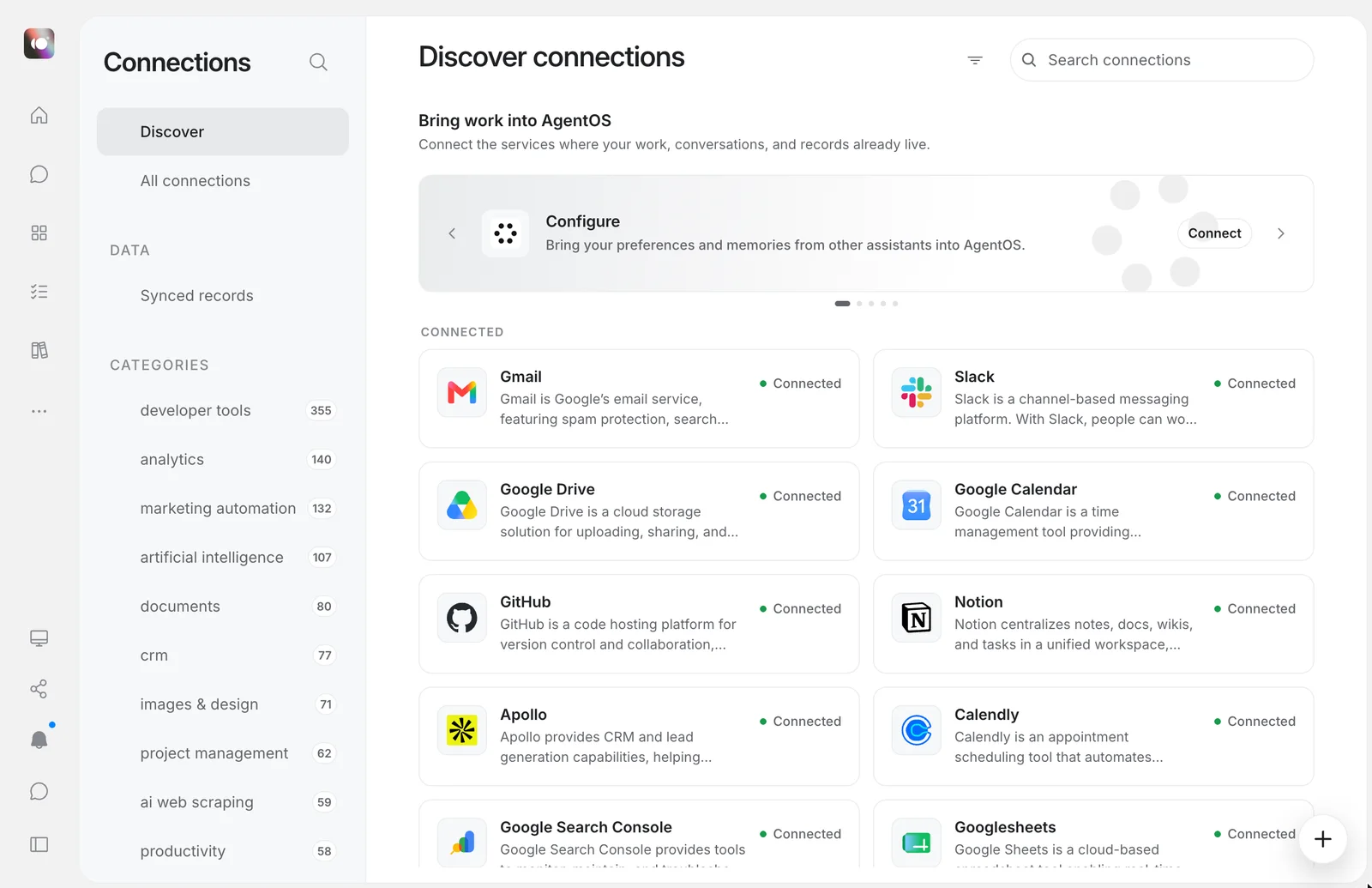
You decide what each tool can see and change, and anything that goes out, like an email to a client, waits for a person to approve it. It also runs recurring work you describe in plain language, such as a Friday client recap.
If you're weighing up the assistants themselves, read ChatGPT vs Claude for business. To see what your team spends across them, try the AI spend calculator. And for the bigger idea, read what a context layer is, or how AgentOS works with ChatGPT.
Questions people ask
What are ChatGPT connectors called now?
Apps. OpenAI renamed connectors to apps on December 17, 2025, and on July 9, 2026 replaced the App Directory with a Plugin Directory. A plugin can include one or more apps plus skills. You'll find them under Settings, then Plugins.
How do I use connectors in ChatGPT?
Open Settings, then Plugins, choose the app, select Install plugin or Connect, and sign in to the account you want ChatGPT to use. Then type @ and the app's name in a chat, or pick it from the + menu, and ask your question.
Which apps can ChatGPT connect to?
OpenAI has setup guides for Google Drive, SharePoint, Microsoft Teams, Outlook, Slack, GitHub, GitLab, Box and Notion, plus Gmail, Google Calendar and Google Contacts. The Plugin Directory lists many more. Availability depends on your plan, region, workspace and role.
Can I build a custom connector for ChatGPT?
Yes. ChatGPT supports custom apps built on MCP, the Model Context Protocol. In a workspace, an admin builds or approves the custom app and makes it available to members.
Does ChatGPT train on data from connectors?
Not by default on ChatGPT Business, Enterprise and Edu. On Free, Plus, Go and Pro, OpenAI may use information accessed from apps for training if your "Improve the model for everyone" setting is on.
Do ChatGPT connectors work with Claude or Copilot?
No. Each AI tool has its own connections. Claude connects over MCP and Microsoft Copilot has its own connectors, so each person sets them up separately in each tool. A shared context layer such as AgentOS lets all of them answer from the same company knowledge.
What is the difference between ChatGPT connectors and Company Knowledge?
Connectors, now apps, link ChatGPT to one service each. Company Knowledge is a plugin on Business, Enterprise and Edu that answers organization-wide questions across all the sources a person has connected, while respecting each source's permissions.
AgentOS is free to try. Connect two or three of the apps your team uses every day, then ask ChatGPT and Claude the same question about your company.
Try AgentOS freeSources
- OpenAI help: connected apps in ChatGPT
- OpenAI help: plugins in ChatGPT
- OpenAI help: Company Knowledge in ChatGPT
- OpenAI help: ChatGPT release notes
- OpenAI help: ChatGPT Business release notes
- OpenAI help: Google Drive app in ChatGPT
- OpenAI help: using Slack in ChatGPT
- OpenAI: introducing apps in ChatGPT
- Claude help: connectors using remote MCP
- Microsoft Learn: Copilot connectors overview
AgentOS is built by Devcore. Found something out of date on this page? Tell us at tryagentos.net and we'll fix it.